mirror of
https://github.com/dotnetcore/AgileConfig.git
synced 2026-10-16 20:21:29 +08:00
 agile.zhou
208 lines
7.2 KiB
Markdown
208 lines
7.2 KiB
Markdown
<p align="center">
|
||
<img height="130" src="https://static.xbaby.xyz/blog/ac.png" style="height: 130px">
|
||
</p>
|
||
|
||
<h1 align="center">AgileConfig</h1>
|
||
|
||
|
||
|
||
[](https://github.com/dotnetcore)
|
||

|
||

|
||

|
||

|
||

|
||

|
||
[](https://codecov.io/gh/dotnetcore/AgileConfig)
|
||
[](https://github.com/dotnetcore/AgileConfig/actions/workflows/release-xxx.yml)
|
||

|
||
|
||
|
||
|
||
# [English](https://github.com/dotnetcore/AgileConfig/blob/master/README_EN.md) | [中文看这里](https://github.com/dotnetcore/AgileConfig/blob/master/README_CN.md)
|
||
|
||
This is a lightweight configuration center based on .net core . It is easy to deploy , easy to learn , easy to use .
|
||
|
||
CN Atomgit Mirror site: [AgileConfig](https://atomgit.com/dotnetcore/AgileConfig)
|
||
|
||
## 😍Features
|
||
1. easy to deploy (docker or IIS)
|
||
2. support distributed deploy
|
||
3. multiple environments support
|
||
4. configuration changes takes effect in real time
|
||
5. support IConfiguration , IOptions patten to read configurations
|
||
6. restful api
|
||
7. version management and easy to rollback
|
||
8. client fault tolerance
|
||
9. support OIDC/SSO
|
||
10. support OpenTelemetry
|
||
11. also can be use as a simple service register center
|
||
12. role base user permission control
|
||
|
||
🔆🔆🔆Demo Project :[AgileConfig Server Demo](http://agileconfig_server.xbaby.xyz) name.pwd= admin/123456🔆🔆🔆
|
||
|
||
Community Resource:
|
||
.NET Client:[AgileConfig_Client](https://github.com/kklldog/AgileConfig_Client)
|
||
JAVA Client:[AgileConfig_JClient](https://github.com/kklldog/agileconfig-jclient)
|
||
GO Client:[agileconfig_client_go](https://github.com/kklldog/agileconfig_client_go)
|
||
Python Client:[agileconfig_client_python](https://github.com/kklldog/agileconfig_client_python)
|
||
GO Client:[go-agile-config](https://github.com/animacaeli/go-agile-config)
|
||
Python Client:[py-agile-config](https://github.com/animacaeli/py-agile-config)
|
||
Nodejs Client: [node-agile-client](https://github.com/LetTTGACO/node-agile-client)
|
||
Rust Client: [agile-config-client](https://crates.io/crates/agile-config-client)
|
||
Blazor UI:[AgileConfigBlazorUI](https://github.com/EzrealJ/AgileConfigBlazorUI)
|
||
|
||
samples :
|
||
[AgileConfigMVCSample](https://github.com/kklldog/AgileConfig_Client/tree/master/AgileConfigMVCSample)
|
||
[AgileConfig WPFSample](https://github.com/kklldog/AgileConfig_Client/tree/master/AgileConfigWPFSample)
|
||
[AgileConfig ConsoleSample](https://github.com/kklldog/AgileConfig_Client/tree/master/AgileConfigConsoleSample)
|
||
|
||
Q&A:
|
||
https://github.com/dotnetcore/AgileConfig/wiki
|
||
|
||
API:
|
||
[restful api](https://github.com/dotnetcore/AgileConfig/wiki/Restful-API)
|
||
## Release notes
|
||
[GitHub Releases](https://github.com/dotnetcore/AgileConfig/releases)
|
||
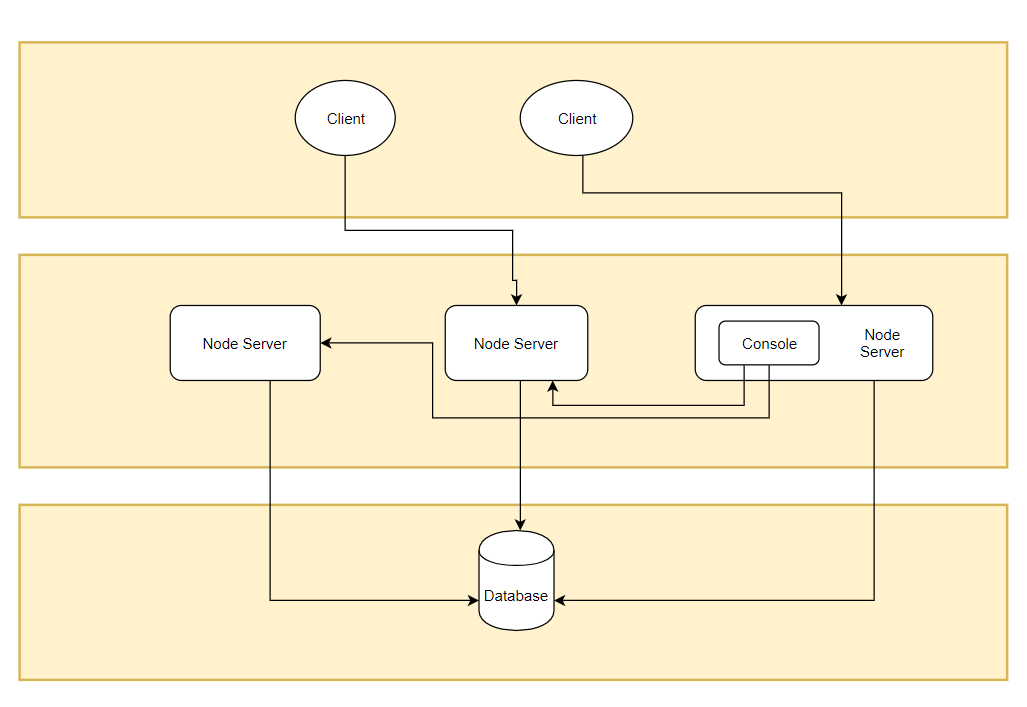
## architecture
|
||
|
||
### client
|
||
A .net client to read configurations from server node .
|
||
|
||
### node
|
||
Node is just a .net core app . Client connect to the node in real time over websocket . Any node can be an admin console to manage configurations.
|
||
### database
|
||
AgileConfig support most popular databases.
|
||
dbprovider :
|
||
sqlserver = SqlServer
|
||
mysql = MySql
|
||
sqlite = Sqlite
|
||
npgsql = PostgreSql
|
||
oracle = Oracle
|
||
mongodb = Mongodb
|
||
|
||
## ✅️How to use ?
|
||
🎥[See video](https://www.bilibili.com/video/BV1FwqeYcEy9/?vd_source=767c7a8e20240041358ff961ab0cb9e5)
|
||
### run node on docker
|
||
``` shell
|
||
sudo docker run \
|
||
--name agile_config \
|
||
-e TZ=Asia/Shanghai \
|
||
-e adminConsole=true \
|
||
-e db__provider=sqlite \
|
||
-e db__conn="Data Source=agile_config.db" \
|
||
-p 5000:5000 \
|
||
-v /etc/localtime:/etc/localtime \
|
||
#-v /your_host_dir:/app/db \
|
||
-d kklldog/agile_config:latest
|
||
```
|
||
|
||
After the docker instance has successfully started you can visit http://localhost:5000 .
|
||
|
||
## use client
|
||
install client lib from nuget:
|
||
```
|
||
Install-Package AgileConfig.Client
|
||
```
|
||
add a section in appsettings.json of you application:
|
||
``` json
|
||
{
|
||
"Logging": {
|
||
"LogLevel": {
|
||
"Default": "Information",
|
||
"Microsoft": "Warning",
|
||
"Microsoft.Hosting.Lifetime": "Information"
|
||
}
|
||
},
|
||
"AllowedHosts": "*",
|
||
|
||
//agile_config
|
||
"AgileConfig": {
|
||
"appId": "app",
|
||
"secret": "xxx",
|
||
"nodes": "http://localhost:5000,http://localhost:5001",
|
||
"name": "client_name",
|
||
"tag": "tag1",
|
||
"env": "dev"
|
||
}
|
||
}
|
||
|
||
```
|
||
in Main function add agileconfig client services:
|
||
``` c#
|
||
public static IHostBuilder CreateHostBuilder(string[] args) =>
|
||
Host.CreateDefaultBuilder(args)
|
||
.UseAgileConfig()
|
||
.ConfigureWebHostDefaults(webBuilder =>
|
||
{
|
||
webBuilder.UseStartup<Startup>();
|
||
});
|
||
```
|
||
|
||
## read configuration
|
||
You can still use `IConfiguration` or `IOption` patten to get the specific configuration value.
|
||
``` c#
|
||
public class HomeController : Controller
|
||
{
|
||
private readonly IConfiguration _IConfiguration;
|
||
private readonly IOptions<DbConfigOptions> _dbOptions;
|
||
|
||
public HomeController(IConfiguration configuration, IOptions<DbConfigOptions> dbOptions)
|
||
{
|
||
_IConfiguration = configuration;
|
||
_dbOptions = dbOptions;
|
||
}
|
||
}
|
||
```
|
||
|
||
Or you can use `IConfigClient` interface to get the specific configuration value.
|
||
|
||
``` c#
|
||
public class HomeController : Controller
|
||
{
|
||
private readonly IConfigClient _configClient
|
||
|
||
public HomeController(IConfigClient configClient)
|
||
{
|
||
_configClient = configClient;
|
||
}
|
||
|
||
/// <summary>
|
||
/// By IConfigClient
|
||
/// </summary>
|
||
/// <returns></returns>
|
||
public IActionResult ByIConfigClient()
|
||
{
|
||
var userId = _configClient["userId"];
|
||
var dbConn = _configClient["db:connection"];
|
||
|
||
foreach (var item in _configClient.Data)
|
||
{
|
||
Console.WriteLine($"{item.Key} = {item.Value}");
|
||
}
|
||
|
||
ViewBag.userId = userId;
|
||
ViewBag.dbConn = dbConn;
|
||
|
||
return View();
|
||
}
|
||
}
|
||
```
|
||
Or you can use a signleton instance without any injection.
|
||
``` c#
|
||
var userid = ConfigClient.Instance["userid"]
|
||
```
|
||
|
||
## donate
|
||
If this project is helpful to you, please scan the QR code below for a cup of coffee.
|
||

|
||
|
||

|
||
|
||
## thanks 💖💖💖
|
||
大鹏¥66.66 , 瘦草¥6.66 + 88 , ziana¥10.0 , Nullable¥9.99 , *三 ¥6.66 , HHM ¥6.66 , *。 ¥6.66 , 微笑刺客 ¥6.66 ,飞鸟与鱼 ¥38.88, *航 ¥9.9, *啦 ¥6.66, *海 ¥6.66, Dyx 邓杨喜 ¥30 And more ...
|
||
## contact me
|
||
mail:minj.zhou@gmail.com
|
||
🐧 group:1022985150
|
||
|